

Baby Panda's School Bus
BabyBus
When I look at a children’s game, I ask a simple question first: does it give a young child something clear and enjoyable to do without turning the phone into a confusing toy box? Baby Panda's School Bus makes a good first impression because its idea is easy to understand. It puts the child in a school-bus setting and turns driving into a playful learning experience. I found it most appealing as a short, supervised activity for preschoolers who enjoy vehicles, familiar routines, and colorful three-dimensional worlds.
This is a free educational game from BabyBus, aimed at Everyone. It has become a very widely used title, with more than a hundred million installs and an average score of 4.5 from roughly 310 thousand ratings. Those figures do not tell me whether every child will enjoy it, but they do suggest that the concept is accessible to a broad family audience. My own view is that its greatest strength is not complexity; it is the way it gives a child a recognizable role and a simple reason to keep playing.
What to consider before choosing a school-bus game
The right choice depends heavily on the child’s age, patience, and reason for playing. A child who wants open-ended driving may quickly find this too guided, while a preschooler who likes repeating everyday activities may appreciate the structure. I would also consider whether the child is using the game alone or with an adult nearby. The experience is easier to turn into a useful learning moment when a parent asks questions about what is happening rather than leaving the game to fill a long stretch of time.
For me, the key decision criteria are clarity, pace, interaction, and replay value. A young child should be able to understand the immediate goal without reading long instructions. The controls should not demand the precision expected from an adult racing game. The activities should change enough to avoid feeling like one repeated tap, but not so much that the child loses track of the situation. Finally, the game should work as a short visit, because many children benefit more from several brief sessions than from one extended sitting.
The school-bus theme helps with that clarity. Children already understand ideas such as getting ready, traveling, stopping, and reaching a destination. Turning those familiar steps into play gives the game a natural rhythm. I found that this makes it easier to talk with a child while they play: “Who is getting on?” “Where are we going?” or “What should happen before the bus moves?” Those questions add language practice without making the activity feel like a lesson.
Related News

Why WhatsApp Messenger Still Makes Everyday Communication Feel Easy

Jurassic World: The Game Is the Better Dino Tycoon for Strategic Players

Threads in Real Life: Who Should Join, Lurk, or Leave

How SHEIN Turned Shopping Into an Endless Content Feed

How to Make Fortnite Feel Smarter on Mobile

Should You Switch to Microsoft Outlook on Mobile?
A gentle entry point for young players
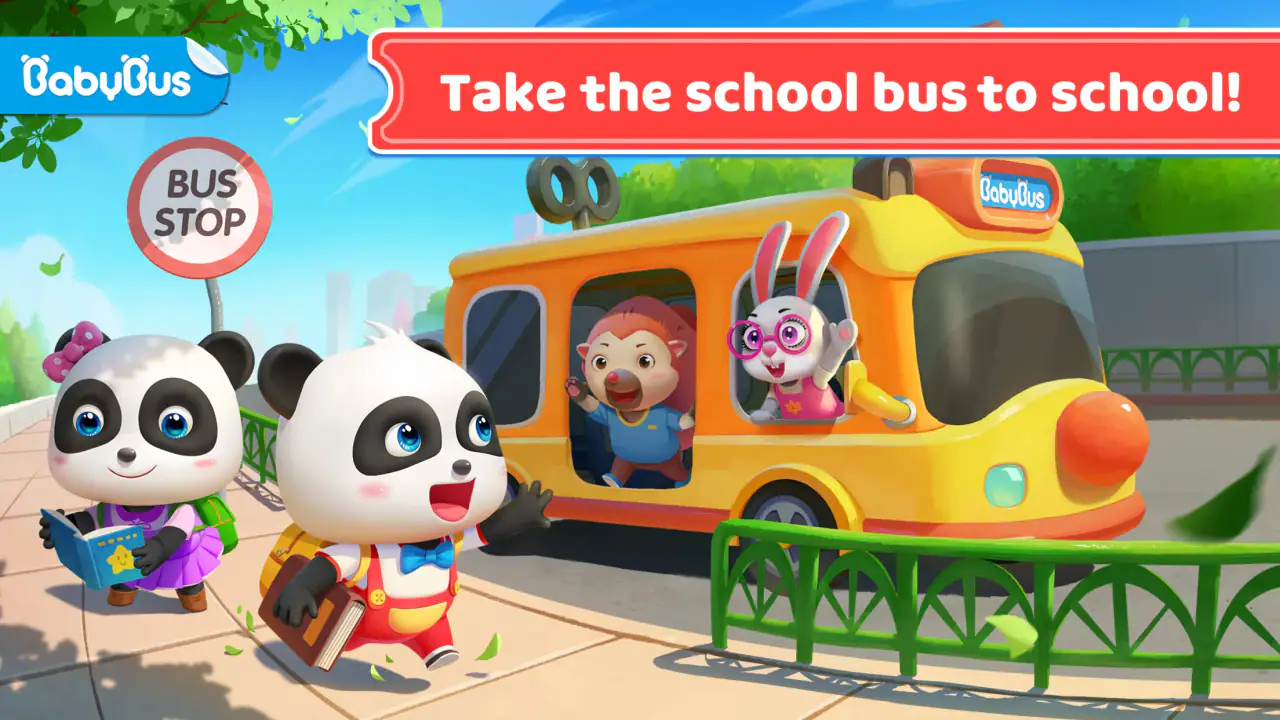
The three-dimensional presentation gives the setting more life than a flat matching activity, but the game still feels designed around a child’s point of view. The bus is the central object, so the child is not forced to learn a complicated interface before reaching the fun. That matters for children who are still developing hand control or who become frustrated when a game reacts too strictly to an imprecise tap.
I would introduce it by sitting with the child for the first session and letting them lead. Instead of correcting every action, I would ask them to describe what they think the bus should do next. This turns the game into a small storytelling exercise. It also reveals quickly whether the child is interested in the school-bus routine or simply wants a faster, more action-focused driving game.
One useful detail in everyday use is that the theme creates natural stopping points. A parent can agree on one short bus trip before dinner, bath time, or leaving the house. That is easier to explain than an open-ended promise to stop “after one more level.” The game therefore works well as a contained activity, provided the adult sets the boundary rather than expecting the child to manage the device independently.
Gallery
Where the game earns its place
Baby Panda's School Bus wins when the goal is a friendly combination of pretend play and basic learning. It is not trying to be a realistic driving simulator, and that is a benefit for its intended audience. A realistic alternative may offer more detailed controls, but those details can become obstacles for a preschool child. Here, the school-bus idea gives the child an immediate context instead of asking them to understand abstract menus, scores, or driving rules.
I also like the way the setting can support conversation beyond the screen. A parent can connect the game with the child’s real experiences: waiting for transport, noticing road signs, helping others, or following a routine. Even if the child is not traveling by school bus, the basic sequence of preparing, moving, and arriving is easy to relate to. That makes the game more useful than a purely decorative vehicle app, because it gives adults something concrete to discuss.
Another strength is its suitability for children who prefer role-play over competition. There is no need to compare performance with a sibling or chase an adult-style racing result. A child can enjoy being the person in charge of the bus without the pressure that often comes with timers, rankings, or difficult obstacles. For a quiet afternoon activity, that lower-pressure approach is exactly what I would want.
The educational label should still be understood realistically. I would not use this as a replacement for books, conversation, hands-on play, or a structured preschool activity. Its learning value comes through guided interaction and repetition. The game can reinforce attention, sequencing, recognition, and vocabulary, but the strongest results come when an adult turns the play into a conversation rather than treating the app as an automatic teacher.
Small strategies that improve the experience
My first practical tip is to use the game as a prompt for prediction. Before the child performs an action, ask what they think will happen. Afterward, ask whether the result matched their idea. This simple pause adds reasoning to what might otherwise be a series of quick taps. It is especially useful for children who rush through familiar activities and need encouragement to observe details.
A second strategy is to let the child explain the route or routine in their own words. Even if the explanation is incomplete, it gives them practice with sequence and cause and effect. I would avoid turning every moment into a quiz. The point is to make the child notice the order of events while keeping the pretend-play feeling intact.
A third tip is to use the bus theme for transition practice. If a child struggles with leaving the playground, getting ready for bed, or moving from one activity to another, a short session can become a model for completing a journey. I would not claim that the game solves routine problems, but its structure offers a gentle way to talk about starting, moving through steps, and finishing.
It is also worth checking the device before handing it over. The game requires Android 6.0 or later, and the current version is 8.73.16.12. I would update it before a planned trip or quiet-time session rather than waiting until the child is ready to play. That small bit of preparation avoids turning the activity into a technical interruption.
Where other types of children’s games may fit better
The best alternative depends on what the child wants from play. If they mainly enjoy building, a construction-focused game may hold their attention longer because it offers more freedom to create. If they prefer songs, letters, or numbers, a dedicated early-learning app may provide a clearer educational progression. If they want speed and challenge, a child-friendly racing game may feel more exciting than a school routine. I would choose this title when the child’s interest is specifically connected to vehicles, travel, and familiar daily actions.
Compared with a driving simulator, this game is likely to feel less demanding and less realistic. That is an advantage for a beginner, but a limitation for an older child who wants exact steering, traffic decisions, or a stronger sense of mastery. I would skip it for a child who already understands simple driving games and is asking for deeper control. The school-bus theme alone may not provide enough challenge once the novelty fades.
Compared with a standard educational quiz, the experience is more playful and less direct. A quiz can make it easier for a parent to see whether a child recognizes a letter, number, or shape. This game is better at embedding learning in a situation. That trade-off matters: choose the bus game for engagement and storytelling, but choose a focused learning tool when you need a specific skill to be practiced repeatedly.
Compared with an open-ended sandbox, the bus setting offers a clearer path but less freedom. Some children feel comfortable when the next action is obvious; others want to invent their own rules. I would watch how the child reacts during the first few sessions. If they keep trying to leave the intended activity and create something else, a sandbox-style game may be a better match for their imagination.
Limitations parents should plan around
The free entry price makes it easy to try, but in-app purchases range from $1.49 to $29.99 per item. I would treat that as a reason to check purchase controls before giving the device to a child. Even when a game is suitable for children, the payment side is an adult responsibility. A child should not be expected to understand the difference between playing and buying something inside the app.
The game may also be less satisfying for families looking for a completely quiet, low-stimulation activity. A colorful three-dimensional world and vehicle theme can be engaging, but some children become overexcited by screen play. I would use it earlier in the day or as a short planned activity rather than immediately before sleep if the child tends to have trouble winding down.
Another limitation is that repeated play can become routine. The same familiar theme that makes the game approachable can eventually make it feel predictable. I see that as a normal trade-off rather than a serious flaw. It is a good title to rotate with physical toys, picture books, drawing, and other games, not one I would rely on as the only digital activity.
Families should also be realistic about supervision. The Everyone rating makes the game broadly suitable, but age labels do not replace parental judgment. A younger child may need help with navigation, while an older child may need a reason to stay engaged. Sitting nearby for even part of a session lets the adult notice frustration, answer questions, and end play at a natural point.
What switching costs look like in real life
Trying this game is relatively simple because it is free to start, but switching away from it has its own practical cost. A child who has become attached to the bus routine may resist moving to a different app, even if the alternative is more educationally focused. I would introduce alternatives by connecting them to the same interest: draw a bus route, read a transport story, sort toy vehicles, or act out a passenger journey. That keeps the child’s curiosity while changing the activity.
There is also a learning curve when moving from this guided format to a game with more complicated controls. A child may need time to understand new menus, goals, or rules. If the purpose is simply to occupy a few minutes, switching may not be worth the adjustment. If the child has outgrown the bus activities, however, the effort can be worthwhile because a more challenging game may support the next stage of their interests.
I would avoid judging the app only by how long it keeps a child occupied. A short session followed by conversation can be more valuable than a long session in which the child taps without thinking. If the game no longer leads to questions, pretend play, or visible curiosity, that is a useful sign to rotate it out for a while rather than trying to force more value from it.
Who should choose it?
I recommend Baby Panda's School Bus to parents looking for a free, approachable educational game for a young child who enjoys buses, vehicles, and everyday routines. It is especially suitable when you want a gentle first driving-themed experience rather than a competitive game or a realistic simulator. The strongest use case is a short, supervised session where the adult adds conversation and helps the child connect the digital journey with real-world ideas.
I would be more cautious if your priority is advanced learning measurement, open-ended construction, or long-term challenge. In those situations, a specialized learning app, creative sandbox, or more demanding driving game may fit better. The choice is not about declaring one format superior; it is about matching the child’s current interest and ability to the kind of interaction the app provides.
BabyBus has made a game that is easy to understand and easy to introduce. Its popularity, 4.5 average rating, and broad reach support that impression, while the free model lowers the barrier to trying it. Still, I would keep the purchase settings under adult control and treat the game as one part of a varied routine. With those expectations, it is a pleasant option for imaginative, vehicle-themed play and a useful conversation starter for preschool learning.
My final recommendation is to try it when the child is drawn to the idea of being responsible for a bus and its journey. Start with a short session, sit nearby, and ask the child to explain what is happening rather than simply watching the screen. If that interaction feels natural, the game has found its purpose. If the child wants speed, freedom, or more demanding goals, move on without hesitation; this title works best because it stays simple, not because it tries to be everything at once.
FAQs for Baby Panda's School Bus
What age group is Baby Panda's School Bus suitable for?
Baby Panda's School Bus is designed for children aged 3 to 6 years. It offers an engaging and educational experience that helps young kids learn about road safety, problem-solving, and social interaction. The app uses colorful graphics and simple controls to ensure that it is accessible and enjoyable for preschoolers.
Is Baby Panda's School Bus safe for my child to use?
Yes, Baby Panda's School Bus is safe for children. The app is designed with kid-friendly content that is free from inappropriate material. It encourages learning and creativity in a controlled environment. However, it's always a good idea for parents to supervise their child's play to ensure a safe and balanced experience.
Does Baby Panda's School Bus require an internet connection to play?
Baby Panda's School Bus can be played offline, making it convenient for use during travel or in areas without internet access. However, for updates and certain features, an internet connection might be required. Always check the app's settings to manage data usage and ensure your child has access to the latest content.
Are there any in-app purchases or advertisements in Baby Panda's School Bus?
Baby Panda's School Bus may include in-app purchases and advertisements. These are designed to enhance the gameplay experience but can be managed or disabled through parental controls. It’s important for parents to review these settings to prevent unauthorized purchases and to ensure that the app remains a safe space for their children.
What educational benefits does Baby Panda's School Bus provide?
Baby Panda's School Bus offers several educational benefits, including teaching children about road safety, responsibility, and cooperation. The app features interactive scenarios that require children to make decisions and solve problems, promoting cognitive development. It also encourages social skills by simulating real-life situations children might encounter while riding a school bus.
Pros
- Engaging and educational for kids.
- Colorful graphics captivate attention.
- Simple controls for young users.
- Promotes problem-solving skills.
- Ad-free experience for safe play.
Cons
- Limited content may bore older kids.
- Requires in-app purchases for extras.
- Can be repetitive over time.
- No offline mode available.
- Heavy on device storage space.


